my.sample = read.csv("https://qtm285-1.github.io/assets/data/nba_sample_1.csv")
your.sample = read.csv("https://qtm285-1.github.io/assets/data/nba_sample_2.csv")5 Homework: The Idea of Calibration
NBA Data
A mutual friends gives us some data describing the performance of NBA players in the 2023 season. Actually, they give us different data—they give me ‘sample 1’ and you ‘sample 2’. They say these are samples of size 100 drawn with replacement from the population of all players that played in the league that year.
Theres a fair amount of information about the players in our samples. Here’s a list of the variables we have.
- Player - The player’s name.
- Team: The team whose this player is playing for this season in abbreviated term.
- Age: The Age of the player.
- GP: The number of games that the player has played in this season.
- W: The number of games won in which the player has played.
- L: The numer of games lost in which the player has played.
- Min: The minutes the player has played for this season.
- PTS: The number of points made by the player.
An Estimation Problem
What we want to know is how many points, on average, a player in the league scored over the course of the season. That is, if we call the number of points these players scored \(y_1 \ldots y_m\), we want this. \[ \underset{\text{estimation target}}{\theta} = \frac{1}{m}\sum_{j=1}^m y_j. \]
We’re going to estimate it exactly the same way, but using our sample \(Y_1 \ldots Y_n\) of size \(n=100\).
\[ \underset{\text{estimate}}{\hat\theta} = \frac{1}{n}\sum_{i=1}^n Y_i \]
Here we’re following a convention in which we write our targets as some greek letter. Often \(\theta\). And add a ‘hat’, the thing above the letter theta in \(\hat\theta\), to indicate an estimator of that thing.
My estimate, for what it’s worth, is 471.56.
Y = my.sample$PTS
n = length(Y)

theta.hat = mean(Y)
theta.hat
[1] 471.56To put it in context, I plot my points around my estimate.
library(ggplot2)

scale_y = scale_y_continuous(breaks=seq(0,2000,by=500), limits=c(0,2300))
scale_x = scale_x_continuous(breaks=seq(0,2000,by=500), limits=c(0,2300))
no_labs = labs(x='', y='')

points.plot = ggplot(data.frame(i = 1:n, y = Y)) +
    geom_point(aes(x = i, y = y), alpha = .4) +
    geom_hline(aes(yintercept = theta.hat), color = "red") +
    scale_y + no_labs
points.plot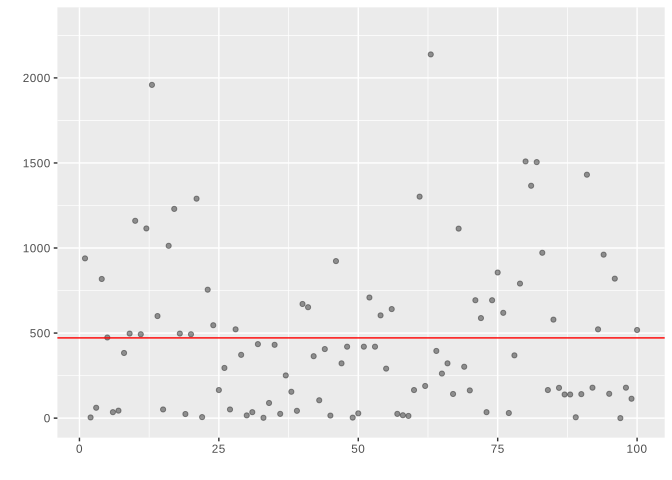
Here the x-coordinate is irrelevant. I’ve plotted pairs \((i,Y_i)\) where \(i=1 \ldots n\) counts out the observations in our sample and \(Y_i\) is the number of points the \(i\)th player in my sample scored. The red horizontal line is my estimate \(\hat\theta\) of the mean point total in the league.
To make it a little easier to see the distribution of season point totals in my sample, I plot a histogram and annotate it with my estimate \(\hat\theta\)—still a red line, but now vertical to fit into the layout of the histogram.
points.histogram = ggplot(data.frame(y = Y)) +
    geom_histogram(aes(x = Y, y=after_stat(density)), bins=20, alpha = .2) +
    geom_vline(aes(xintercept = theta.hat), color = "red") +
    scale_x + no_labs
points.histogram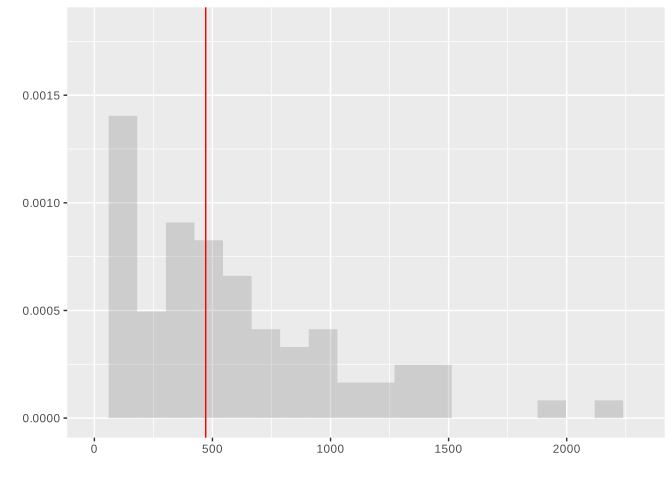
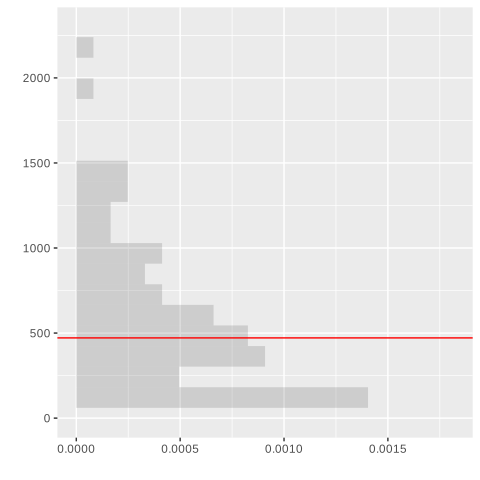
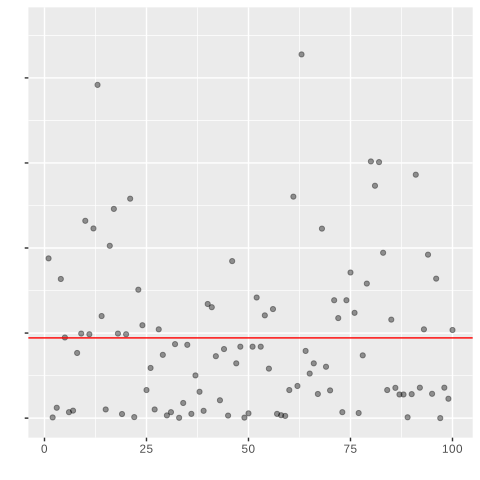
To make these fit together nicely, I rotate my histogram and lay my two plots out side by side so that the bins of the histogram align with the individual players’ points.1
points.histogram + coord_flip()
points.plot + theme(axis.text.y = element_blank())- 1
-
This
coord_flip()call rotates the histogram plot so the bins are horizontal. - 2
-
The
theme(...)call turns off the vertical ‘tick labels’ 0, 500, … in the plot on the right. They’re redundant because our grids are aligned and we’ve already got the on the left.
You notice that my estimate and yours are fairly different. To try to understand what’s going on, you want to run a simulation study. You call up our mutual friend and request they give you the data for every player in the league. And you get it. Here it is.
our.pop = read.csv("https://qtm285-1.github.io/assets/data/nba_population.csv") People do prefer an interval estimate to a point estimate. Let’s report some. Rather than calibrate our estimates using our samples, as we usually have to do in real life2, we’ll take advantage of our knowledge of the actual sampling distribution as we did in this week’s lecture. The one from Exercise 6.2.
Hopefully this week’s lecture has convinced you that this interval will have 95% coverage. But let’s check by calculating the coverage, the proportion of confidence intervals that contain our estimation target. This’ll be useful in the future when what we’re doing is a little more complicated and error-prone.
Interval Width as a Function of \(\theta\)
In our NBA example, we calculated the width of a 95% confidence interval using simulation. But for simple cases like estimating a proportion with binary data, we can calculate the width exactly using the binomial distribution.
binom.width = function(p, n, alpha = 0.05) {
  # Find the width of the middle (1-alpha) of the binomial sampling distribution
  cdf = function(x) pbinom(n * x, n, p)
  covg.dif = function(w) {
    actual = cdf(p + w/2) - cdf(p - w/2)
    nominal = 1 - alpha
    actual - nominal
  }
  uniroot(covg.dif, interval = c(0, 1))$root
}
This function calculates the width of an interval centered at \(\theta\) that contains 95% of the sampling distribution of \(\hat\theta\) when we’re sampling \(n\) observations with replacement from a population with proportion \(\theta\).
When you do this, it’s important to make sure the grid lines in your two plots line up. To do that, be sure to set the same limits on the x-axis in both plots and make sure axis labels aren’t shifting things up or down. You can do the former by setting
breaksandlimitsinscale_*_continuousand the latter by sayinglabs(x='', y='')to turn axis-labels off.↩︎That’s next week stuff.↩︎
We’ll get into what the code is doing in next week’s homework. But if you want to know now, go ahead and give it a read. See if you can work it out.↩︎